Showing posts with label 3d. Show all posts

Monday, August 19, 2013

50% Grey Midpoint in Maya Diplacement

Maya displacement is something that I avoid using as much as possible.

I've always maintained that my reluctance is because I don't have much experience with sculpting (Though I've used Mudbox a little bit), and that no matter how I do it, greyscale displacement maps never look as nice as a normal map.

That being said, I've discovered that greyscale normal maps don't import into Maya correctly (to my view).

Logically, I would expect a value of 50% grey to not change the displacement of an object at all, while white would be the equivalent of 100% displaced up, and black 100% displaced down.

Maya by default takes black as no displacement and white as 100% displaced up.

In order to fix this, you need to put the following formula into the Alpha Offset slot of the file node which holds the displacement image:
=-0.5*%FILE%.alphaGain
Where %FILE% is the name of the file node (or texture node if you're not using a file). We use the value of -.5 to shift the midpoint down 50% from white to mid grey. 

Your displacement should now work correctly.

Tuesday, August 16, 2011

Learn to Animate with the free Animation Insiders ebook!

Animation is not an easy art to master, and getting resources to study it can be very expensive, and it can be hard to know what's good advice and what isn't.


If you're passionate about animation and have a piggybank to smash open, I recommend The Animator's Survival Kit by Richard Williams, a genius and master of the art. It's industry standard for aspiring animators and is packed full of useful tips and diagrams (we all know how hard it is to read massive blocks of text).


BUT, if you want to learn a bit more economically, the crew at Squeeze Studio have released their own book, Animation Insiders - Workflow edition.


This book is packed with brilliant advice, tricks and tips, with a focus on workflow, the step by step of how the contributing animators work. Best of all, You can download it for free from Squeeze Studio!


Check it out :)

Wednesday, June 22, 2011

Brilliant Lighting Book: Light for Visual Artsits by Richard Yot

Light for Visual Artists by Richard Yot

A few weeks ago I finally received my copy of Light for Visual Artists by Richard Yot. I wasn't really sure what to think of this book, as it wasn't squarely aimed at 3D artists, but is a bit more of a general reference.

It really is a marvelous book for 3D artists. Although it doesn't hold your hand and show you how to create each effect in 3D, it's a great resource listing many types of light and examples of each.

It covers basic studio lighting setups, outdoor and indoor light, natural light, various shadow properties, the way light reacts to different types of materials like chrome and translucent objects, colour bleeding and everything in between. I especially love the way each type of lighting discussed comes with the same picture of a white ball on a white background, so you can compare with other chapters and study the differences.

Although many of the subjects covered are not new, and anyone who has studied light in a decent capacity will probably know most of the contents, this book still has fantastic value as a reference tool, a cheat sheet for whatever you're working on.

I'm very impressed and would recommend this to anyone interested in lighting, both in 3D, 2D, and even film/photography.

Here's a link to the Publisher's website where you can see some example pages and a chapter list, and a link to Richard Yot's website where he's got a lot of great content under the tutorials section.

Tuesday, June 21, 2011

An Introduction to the Facing Ratio Property.

This is probably an old trick, but it can be a bit confusing how to hook it up, so I thought I'd pop a brief outline on here.

The Facing Ratio trick is a great way to simulate lots of things where a lighter colour is required around edges. It's good for making glass, velvet, car paint and fake subsurface scattering out of standard Maya shaders, and I'm sure there are other uses for it too.

I'm just going to give you the basics of how to hook this up.

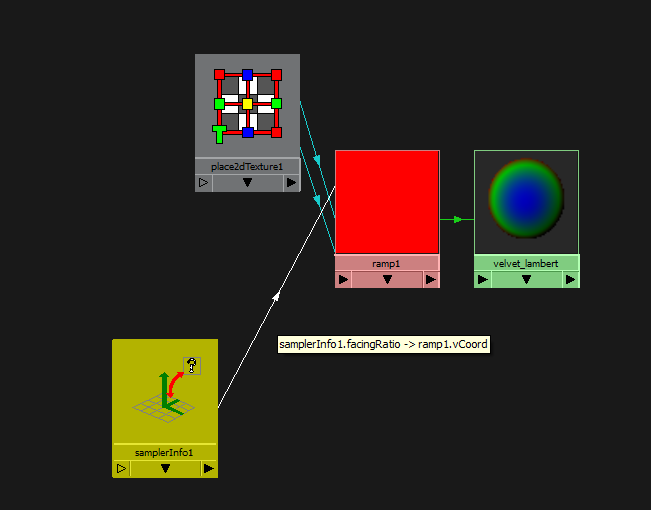
You need a sampler info node from the Utilities rollout in your hypershade, and a ramp texture.

It's all really simple, middle mouse drag the sampler info node in your work area to the ramp texture node.

A menu will appear, asking how you want to connect the nodes, just click other. The connection editor will pop up, and you want to click facingRatio on the left and connect it to uCoord or vCoord (expand the uvCoord rollout) depending on how your ramp is set up (vCoord for a V Ramp, uCoord for a U Ramp, doesn't matter which way you do it).

This will now place the top colour of your ramp facing the camera, and the bottom colour just around the edges facing sideways from the camera.


From here you can plug it into anything you like, Incandescence and colour works well for velvet, but play around with it and see how you go. It can probably be used in conjunction with mia shaders for some cool effects too.

Don't forget you can map each selected colour in your ramp with other nodes!

Tuesday, June 14, 2011

sIBL: Fast, Free and Fabulous-looking Image Based Lighting

Today it's my birthday, and what better way to celebrate it than to give you all a present!

I found this neat little program/script/plugin for 3D applications called sIBL.

Image based lighting is a great way to integrate your 3D models into a real-world photo and create a realistic lighting environment for your CG work. Unfortunately, while it’s not hard to set up (in Maya at least), neither is it easy to get it looking great while still rendering very quickly.

sIBL is an external tool, independent of any 3D software which creates fast and splendid looking scripts for various 3D packages to encorporate image based lighting. Best of all, it’s absolutely free.

The team at HDR Labs also have a big library of free HDRIs tailored for use with sIBL that are easy to use and look fantastic.

I had a brief play with it for our paper puppet film, Keeping Station, and it worked perfectly. So at the risk of sounding like their marketing department is paying me, check it out!

Monday, June 13, 2011

A Quick Tip for Faces

Today I wanted to share something that one of my workmates showed me. Whether you’re doing 2D or 3D art, faces are really important to get looking right. We stare at them every day of our lives and we notice when they look a little bit off.

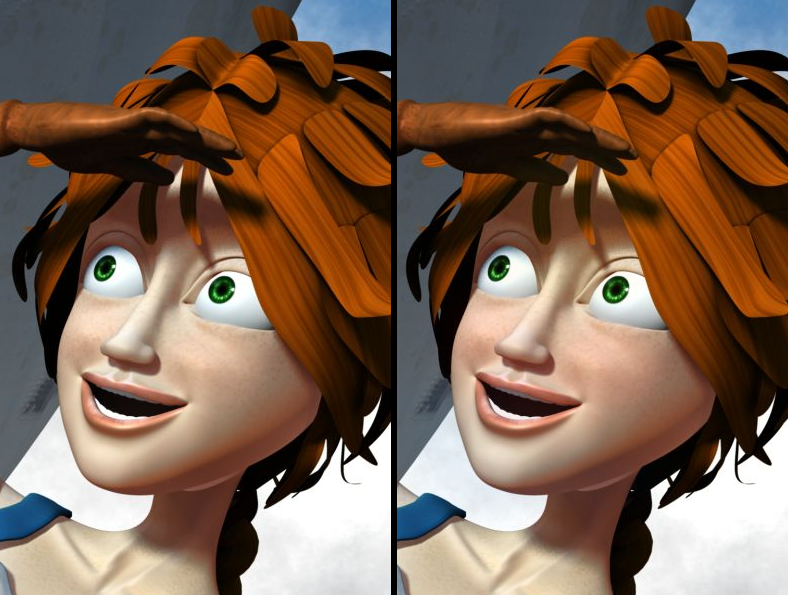
Dean made a great observation about hue shifts through the face. Due to the way blood vessels are grouped, colours are different in various areas. The bottom jaw and lip area takes a slightly bluish tinge, the nose and cheekbones a pinky red tone, and the forehead (being mostly bone) is slightly yellower.

Here’s a quick paintover to illustrate my point. This is one of my older characters. On the left, she’s been painted in a standard way with a skin shader. On the right, I’ve overlaid a slight hue shift through her face, which instantly gives a lot more life and volume to it. It’s probably a bit strong but I wanted to make it easier to see.

Try it out with your own work and see how you go!

Coloration Difference

Tuesday, February 8, 2011

Messiah Studio $10 challenge

http://projectmessiah.com/x6/shop.html

I stumbled on this the other day. pmG's messiahStudio is an Animation and rendering package that's really made for tough animation. It's been used in films, ads, games etc for awhile now, and costs around $500-$1200 USD. They're currently trying to get a lot of people to buy it, and so are offering it for $10 (standard) or $40 (pro).

Here's the challenge to the 3D industry:

We're doing an unprecedented viral test marketing campaign where your success in sharing this offer will allow you and others to get our amazing award winning animation and rendering software ( messiahStudio5 ) for the unheard of price of just $10 (regularly $499) or choose the Pro version for just $40 (regularly $1195). When this experiment ends, the prices will return to normal.


This is the same software that studios and individuals, in more than 60 countries of the world, have been using to create visual effects for some of your favorite movies, commercials, games and music videos; and now you can get it at a no excuses price, if you "Dare To Share™". People using our software have been nominated for Academy Awards, and changed their lives creating things they'd never thought possible on their own. CG Animated Features, Visual Effects, Consumer Product and Architectural Visualization, Simulation, Plugin Development, Smart Phone App Animation and Game Development Export; What will you do?


Everyone needs a chance to show what they can do. That chance is more often limited by money; maybe that's you, maybe that's someone you know; a parent, a friend, some students of yours. We got a chance to prove what we could do starting out, and now we're giving one to you. It's the best deal we've ever offered, and a chance you'll probably never have again. Order now to reserve your copy; we will accept no crying if you miss out : )


Rules: Everyone can only receive their license when the goal is met. That's your incentive to spread the word and share the offer.

This offer is open to: Individuals, small businesses, hobbyists, starving artists, the unemployed, schools, students, CG studios, game developers, plugin developers, architects, tinkerers, compositors and aspiring movie makers, in any country. Limit 4 copies per customer, mix and match.


We will update the progress bar so you can see where you're at in reaching that goal. When the bar reaches the end, we will close out the offer and no further orders will be allowed; no exceptions. In the event the goal is not met, we will simply refund everyone. Whether you get the software for this amazing price is up to you, and how well you get the word out.


If you need to purchase licenses of the software to use right now for a project, you can purchase them normally HERE -> Buy Normal, and if the goal is met from this offer, you will be refunded the difference in price between the equivalent version you purchased, and the Dare To Share™ special.


http://projectmessiah.com/x6/shop.html

Sunday, November 28, 2010

First Contact Movie

It's been 13 weeks in the making for the 14 of us in the graduating class of advanced 3D at Media Design School, plus about a month of waiting for the sound and grade, but here it is, finally done.

First Contact!

First Contact from Media Design School on Vimeo.